


Direct navigation — the act of visiting a website by manually typing a domain name in a web browser — has never been riskier: A new study finds the vast majority of “parked” domains — mostly expired or dormant domain names, or common misspellings of popular websites — are now configured to redirect visitors to sites that foist scams and malware.
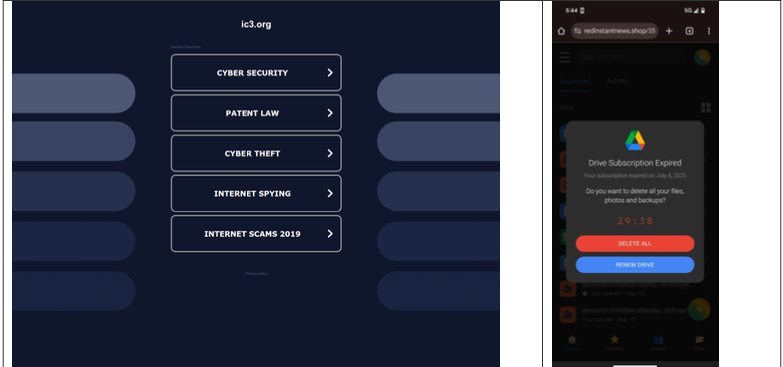
A lookalike domain to the FBI Internet Crime Complaint Center website, returned a non-threatening parking page (left) whereas a mobile user was instantly directed to deceptive content in October 2025 (right). Image: Infoblox.
When Internet users try to visit expired domain names or accidentally navigate to a lookalike “typosquatting” domain, they are typically brought to a placeholder page at a domain parking company that tries to monetize the wayward traffic by displaying links to a number of third-party websites that have paid to have their links shown.
A decade ago, ending up at one of these parked domains came with a relatively small chance of being redirected to a malicious destination: In 2014, researchers found (PDF) that parked domains redirected users to malicious sites less than five percent of the time — regardless of whether the visitor clicked on any links at the parked page.
But in a series of experiments over the past few months, researchers at the security firm Infoblox say they discovered the situation is now reversed, and that malicious content is by far the norm now for parked websites.
“In large scale experiments, we found that over 90% of the time, visitors to a parked domain would be directed to illegal content, scams, scareware and anti-virus software subscriptions, or malware, as the ‘click’ was sold from the parking company to advertisers, who often resold that traffic to yet another party,” Infoblox researchers wrote in a paper published today.
Infoblox found parked websites are benign if the visitor arrives at the site using a virtual private network (VPN), or else via a non-residential Internet address. For example, Scotiabank.com customers who accidentally mistype the domain as scotaibank[.]com will see a normal parking page if they’re using a VPN, but will be redirected to a site that tries to foist scams, malware or other unwanted content if coming from a residential IP address. Again, this redirect happens just by visiting the misspelled domain with a mobile device or desktop computer that is using a residential IP address.
According to Infoblox, the person or entity that owns scotaibank[.]com has a portfolio of nearly 3,000 lookalike domains, including gmai[.]com, which demonstrably has been configured with its own mail server for accepting incoming email messages. Meaning, if you send an email to a Gmail user and accidentally omit the “l” from “gmail.com,” that missive doesn’t just disappear into the ether or produce a bounce reply: It goes straight to these scammers. The report notices this domain also has been leveraged in multiple recent business email compromise campaigns, using a lure indicating a failed payment with trojan malware attached.
Infoblox found this particular domain holder (betrayed by a common DNS server — torresdns[.]com) has set up typosquatting domains targeting dozens of top Internet destinations, including Craigslist, YouTube, Google, Wikipedia, Netflix, TripAdvisor, Yahoo, eBay, and Microsoft. A defanged list of these typosquatting domains is available here (the dots in the listed domains have been replaced with commas).
David Brunsdon, a threat researcher at Infoblox, said the parked pages send visitors through a chain of redirects, all while profiling the visitor’s system using IP geolocation, device fingerprinting, and cookies to determine where to redirect domain visitors.
“It was often a chain of redirects — one or two domains outside the parking company — before threat arrives,” Brunsdon said. “Each time in the handoff the device is profiled again and again, before being passed off to a malicious domain or else a decoy page like Amazon.com or Alibaba.com if they decide it’s not worth targeting.”
Brunsdon said domain parking services claim the search results they return on parked pages are designed to be relevant to their parked domains, but that almost none of this displayed content was related to the lookalike domain names they tested.
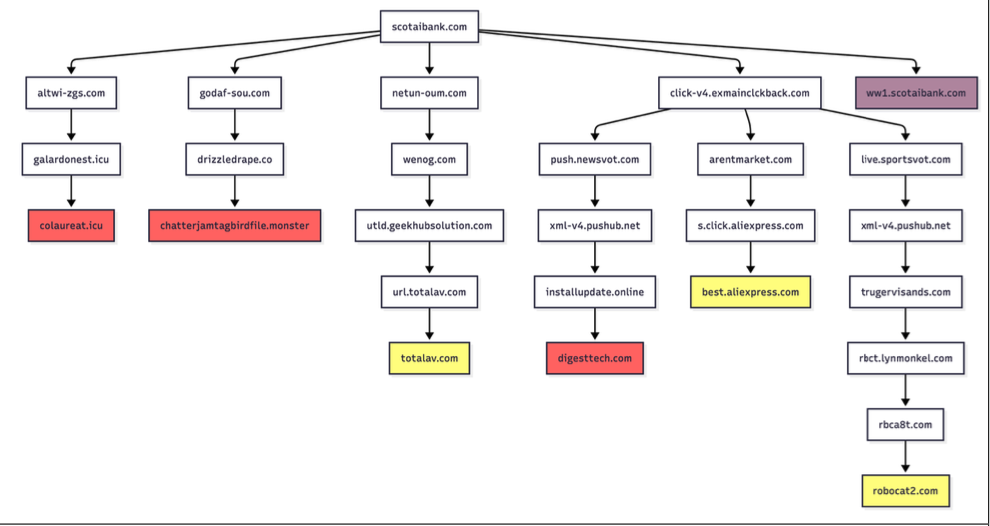
Samples of redirection paths when visiting scotaibank dot com. Each branch includes a series of domains observed, including the color-coded landing page. Image: Infoblox.
Infoblox said a different threat actor who owns domaincntrol[.]com — a domain that differs from GoDaddy’s name servers by a single character — has long taken advantage of typos in DNS configurations to drive users to malicious websites. In recent months, however, Infoblox discovered the malicious redirect only happens when the query for the misconfigured domain comes from a visitor who is using Cloudflare’s DNS resolvers (1.1.1.1), and that all other visitors will get a page that refuses to load.
The researchers found that even variations on well-known government domains are being targeted by malicious ad networks.
“When one of our researchers tried to report a crime to the FBI’s Internet Crime Complaint Center (IC3), they accidentally visited ic3[.]org instead of ic3[.]gov,” the report notes. “Their phone was quickly redirected to a false ‘Drive Subscription Expired’ page. They were lucky to receive a scam; based on what we’ve learnt, they could just as easily receive an information stealer or trojan malware.”
The Infoblox report emphasizes that the malicious activity they tracked is not attributed to any known party, noting that the domain parking or advertising platforms named in the study were not implicated in the malvertising they documented.
However, the report concludes that while the parking companies claim to only work with top advertisers, the traffic to these domains was frequently sold to affiliate networks, who often resold the traffic to the point where the final advertiser had no business relationship with the parking companies.
Infoblox also pointed out that recent policy changes by Google may have inadvertently increased the risk to users from direct search abuse. Brunsdon said Google Adsense previously defaulted to allowing their ads to be placed on parked pages, but that in early 2025 Google implemented a default setting that had their customers opt-out by default on presenting ads on parked domains — requiring the person running the ad to voluntarily go into their settings and turn on parking as a location.

Could you give us non-techy people suggestions on how to avoid these parked domaines?
Use your favorites to get to sites you often use?
Use a VPN?
Anything else?
I’m not one of those people who urges everyone to use a VPN for everything, mainly because most VPN providers are trash. But in this case it obviously would help. So would relying on bookmarks for important/frequently visited sites.
Thanks, Bryan. I always use bookmarks for frequently visited sites.
‘Bryan’ Krebs is a typo, so demonstrated…
Using a password manager can help too! It stores the web site so first I open the password manager then use that to launch a known good site and then my password can be entered with no chance of a typo.
And a relatively small but not infinitesimal chance of the pw manager itself being rooted…
Thank you! I had not thought of that.
Use NoScript or a similar browser extension to disable scripting by default on pages you haven’t visited since these redirects are all driven by JS code.
I concur and will leave this here for those that are interested -> noscript.net/usage/?topic=settings
Thanks, yes, I meant to mention this also. Script blockers are great, especially for really paranoid and security-conscious people. I recognize, however, that a lot of people can’t be bothered to approve 1-5 scripts on each page just to be able to read it. YMMV.
Tricky, trying to decide on whether to turn of content blockers or not with any decent ad blocking plugin (some VPN provider software blocks it apart from the browser; some browsers have this built-in without a plugin). Sometimes blocking off an IP range works; sometimes it makes things unusable. Brian is correct in saying YMMV, ironically, almost two decades on from ad-block software being introduced.
Yeah, I’m “paranoid” because I don’t like getting hijacked to an alien domain where it’s scripts can run freely. So I use UMatrix with first-party domains set to castrated by default.
Script blockers like NS remember your settings, so you only have to approve the first time. Usually, the high level script will show you the content and that is good enough.
The problem is when pages use humongous number of scripts and you need to approve most of them to get the page to work. That gets annoying fast. Most of the time I will just blow the page off as most content on the net can be found in multiple places.
As a long-time user of script blockers, I now find that the biggest problem with them is websites’ anti-bot security blocking me when I approve scripts (which reloads the page), probably because at least one major provider of those services seems to verify a “fingerprint” of the browser against a previous value stored in a cookie. Clearing history used to fix this, but recently it doesn’t always work – perhaps similar checks are being done on the server side too.
I’ve also had problems with IP reputation despite having an IP address that rarely changes, being very cautious about security, and certainly doing nothing sketchy let alone malicious myself. I’ve had to force an IP address change a few times to reduce excessive CAPTCHAs and blocking, sometimes even when signed in to websites.
I fear that the arms race of website security is leading to a place where websites block anything that is unusual, even just an unusual browser configuration by a privacy-conscious user – and perhaps even score it negatively for IP reputation, without a shred of evidence of malicious intent. (The use of AI/ML probably isn’t helping here, because it’s so easy to just model “normal” behavior and reject anything that doesn’t fit.)
Using a VPN from a static IP also can seem to trigger what you’re talking about.
The big guys are VPN-antagonists, they want to know who/what/where you are.
Anything less deserves nonsense robot hassles.
I rely on default js=off and images=off (in Chrome) and only allow sites I visit regularly to render such content.
It means that if I have gone to a place before and want to be there, I’ve already enabled scripts, and if not, I’m probably in the wrong place.
Along w/ the fact that places you go to in your non incognito browser are generally completed by your browser when you use the url bar, which means I _generally_ return to where I’ve been. Bookmarks + frecency are my friends.
It’s incredibly difficult to avoid typosquatted domain names, taking advantage of human psychology to skim words and sentences.
I’d recommend turning on safe browsing mode (Enhanced) in Chrome and considering something like the Ward Chrome extension to detect threats in real time. To answer your original question staying educated on these is your best defense.
One should be careful what he types. Typing directly into the browser still is THE most secure way to visit the websites. Following links is not, by far.
> Typing directly into the browser still is THE most secure way
Direct typing does not address the problem of typo squatting on similar domain names. Saying “Be careful” ignores real life where you’re distracted and in a hurry. Carefully type and double check, then use the browser’s bookmark feature.
Not for me. I’m dyslexic and often transpose letters. When I reread them, they can look fine to me. A trusted bookmark has always been my best bet. That and a good browser security. Malwarebytes Browser Guard has been my go-to for several years.
I suppose, so-long as your Windows machine is not already ‘owned’.
I have BitDefender anti-virus and when I visit one of these parked sites I at least get a warning that it is a phishing page.
There are browser plugins from malwarebytes and bitdefender and eset and others, all free, which do exactly that. You don’t have to have the full subscription product, they are standalone.
I kinda prefer the standalone version for mobile, though I use a secondary blocker inside my browser for more insidious attempts at forced serving.
There’s a million defensive combos possible and nobody knows most effective vs unknown attackers, but if you start from a zero permission basis and work outwardly from there, I find you can glean which are the necessary evils in the order of least obtrusive. Mobile vs non-mobile works the same in terms of polling the central DB for known-bad urls and patterns. It’s all about what makes the most personal UX sense.
Recently I have had this experience multiple times while using Google or Chrome on either my desktop PC or on my iPhone. After typing the name of the corporate or retail website that I wanted to visit, Google would offer up a list of choices that included fake websites that were located at the very top of the list of page offerings. As a very advanced and educated computer tech, I can quickly spot the fakes but I am positive that many other people do not possess my level of knowledge and skills.
First time testing NextDNS ‘Block Parked Domains’ and scotaibank[.]com still loaded at home. On Browserling I just got a normal parked page. Guess I can’t really rely on that feature alone…
Is there no authority that can investigate such obviously ill-intentioned practices?
ic3[.]org?
Pretty sure, from experience, that most messages at the ic3 site are used primarily for data gathering. I know of not a single person who received a personal reply through any complaint filed on ic3 in all the years it has been around. They seem pretty picky about what they will pursue via the web page (who the hell knows what they do outside of it; very few individuals get redress though).
You’re somewhat right, I believe. But as I understand it, the IC3 data is useful when they’re trying to put a case together, because most cases cannot be brought to prosecutors without passing a certain monetary threshold. So, the more victims and the more reported losses, the greater the chance that some prosecutor will be able to bundle those together and charge someone — assuming they can figure out who did it.
That’s exactly what I was thinking, ‘there ought to be a law’… robots can easily find sites serving up malware and hosts can easily be pressured as locally applicable to take them down. Why isn’t that the norm, instead of the MAJORITY of such sites serving up whatever they want with hardly an official notice? Put even a small bounty on such activities and someone can make a tidy profit from cleaning the public pool that is our web.
No. Most politicians are too busy collecting their lapdog payments from those who are interested in scamming their constituents.
There are some approaches involving registrars:
– https://www.icann.org/resources/pages/trademark-infringement-2017-06-20-en
– https://www.icann.org/en/blogs/details/thought-paper-on-domain-seizures-and-takedowns-8-3-2012-en
I think there are examples of Google suing:
– https://www.legalreader.com/google-sues-to-stop-ai-scammers-and-copyright-fraud/
I don’t think it happens particularly often. Unfortunately I expect that the costs for Google exceed their returns. (As the victims of the mistake can at most ding Google reputationally but not legitimately if they mistakenly go to a typo’d domain.)
I think in theory there’s an incentive for brands to enforce trademarks, so it’s possible they really should go after these impersonators, but I’m not certain about the details.
Ooh ooh, I know! Let’s add checksum digits to every domain name, to detect bad names. Just like the last 4 on a credit card number. Or like should be added to Social Security Numbers.
This section confused me:
“Google may have inadvertently increased the risk to users from direct search abuse. […] in early 2025 Google implemented a default setting that had their customers opt-out by default on presenting ads on parked domains”
It didn’t seem obvious to me how this would lead to an increased risk, and the term direct search wasn’t introduced in the article.
In case anyone else did a double take on that paragraph, here’s what I gathered from the source: Google ads are a major revenue stream for many owners of parked domains, and this new default setting drastically reduces the ads they get to show. In response, many domain owners/squatters switched to a model called direct search, in which visitors are redirected to a highest-bidder site, a model which is more susceptible to scam and malware referrals than Google ads. So the risk increase here is indirect, by nudging owners of parked domains towards relatively more abuse-prone monetisation options.
OpnSense firewalls have optional Zenarmor security that includes blocking parked domains. Occasionally is misidentifies a domain as parked when it’s really part of a legit process’s infrastructure. You can add such a domain to the “allow list” and contact the legit service to tell them so they can hopefully address it. But I haven’t had to do that more than 2 or 3 times. How do you know when it happens? You can’t reach a site or an app doesn’t work, then you look at Zenarmor in the firewall.
Zenarmor has a home-user $99/year plan (I use it) and a small business $540/yr plan (a client uses it).
OpnSense is open source software you can install on a wide variety of hardware of your choice or you can buy a complete OpnSense firewall from various sources including shop.opnsense.com.
Before the tarrif stupidity, I bought the Dutch-made DEC 850 and run it with the “community” free version of software, and I pay Zenarmor $99/yr for a personal subscription. I also replaced a small business’s SonicWall firewall with a DEC 850.
OpnSense also includes Wireguard VPN instead of old perpetually vulnerable SSLVPN and similiarly exploited VPN included with SonicWall firewalls (though SonicWall vpn server products offer WireGuard also).
OpnSense is based on FreeBSD UNIX and split from pfSense years ago. It’s vastly superior in my experience struggling with pfSense.
Zenarmor runs on lots of different hardware but I’ve only used it in OpnSense. According to its doc, it runs on OPNsense, FreeBSD, Ubuntu Linux, OpenWRT, Debian Linux and pfSense.
Note that you can install free OpenWRT in your low-cost router to replace its shaky operating system. Then you can run Zenarmor.
Remember, though, that the more security stuff you enable in your firewall, the more it slows internet traffic as its processing everything as it comes in, unless it’s powerful enough everything and without decreasing your internet traffic speed.
When choosing hardware for a firewall, make sure to read its throughput rate when under heavy security load and VPN load, not just its general throughput. E.g., its specs might show it handles 17 gbps throughput, all right! but only 2.5 gbps “threat protection throughput” and 2 gbps for IPSecVPN. That’s still good and overkill for a 1gbps internet connection but if you have 10gbps, that’s not fast enough. Just look for the slowest X gbps throughput in the specs instead fo the fastest.
You’ll find this out the hard way like I did when you turn on lots of cool firewall security features then watch your internet speed fall unless your firewall’s got enough power.
What’s the most interesting in all this is that none of this can be done without a compliant registrar. Or one that doesn’t care.
There is an old app on Windows called Spywareblaster that might be of interest also. There are free and paid versions:
https://www.brightfort.com/spywareblaster.html
Funny you mention that. I still use the damn thing on my personal, and my clients’ PCs. I thought I might be the only one left who uses it.
Replaced , with . Added. 0.0.0.0. at the beginning of each line. Added to my custom pi-hole block list. Replaced existing block list. Thank you Brian.
Misspelling a name by mistake is one thing. Who types [.] by mistake?
A joke within a joke within brackets. Thanks for lightning my mood
I’m in the mood for more lightning too.
It is standard practice in security is to defang (make secure) potentially malicious URLs, domains, or IP addresses when discussing them. Another common one is replacing “https” with “hxxps”.
On the plus side, the internet has deteriorated into wholesale crap, so that time is better spent enjoying life and love. The two largest footprints for most people are Google and Facebook, and both survive by selling commercials that would have made late night TV advertisers blush. You can’t survive without crypto. Tai Chi walking will make you thin. Utter swill. By comparison, Pocket Fisherman was brilliant.
I would like to give a big FU shout out to Synchrony Financial–(a large USA Credit Card parking bank, that services CCs for businesses that are not in the CC or banking industry.)
Synchrony maliciously redirects their customers to other sub-corporate sites to train their customers to allow redirected sites syf[.]com synchrony[.]com syncbank[,]com synchronybank[.]com synchronyfinancial[.]com. They do not own a couple of syncwhoops[.]com to get you to the real corporate site. Instead, Synchrony tells you to go to their official website (I really do not know what it is called since they maliciously bounce) and bounce you around to different domains.
Easy case in point: when signing up for an Amazon card, they direct you to syncbank[.]com/amazon. Go to this plain domain; it is an empty parked website: “not found”. Should I be trusting such a suspicious unprofessional site? According to Synchrony: Sure! It is just your bank & money–do not worrry!
syncronybank[.]com synchonbank[.]com syfinservbank[.]com syncservices[.]com synchronyservices[.]com syncbankservices[.]com; It is all just fine. Just assume that you are really interfaced with the bank and not a scam.
Synchrony has been repeatedly warned about their unprofessional mimicking of malicious behavior to train their customers to accept redirects as fine. *quick safety check* Am I still on the proper syncbank.com website? No. No. Of course not. It is probably just fine. Now what is your account & pswd?
Seriously–close your Amazon card & boycott this reckless financial wrecker. And shame on you Amazon for not choosing a legitimate bank to service your credit card.
I typed donerbox.org in Brave instead of the intended website donorbox.org to support an on line blogger, it prompted me to download a SafeDomainGuardian.Msix about 145.6 megabyte file. I uploaded it to virustotal, there were no detections, but it had a community score of -2. Virustotal said it contained over 1400 files. In Firefox it prompted me me to install a Yahoo plugin, supposedly.
I did not launch this msix or install any plugins. I have both Webroot and Malwarebytes browser guard, neither alerted me of any trouble. I placed donerbox.org in my hosts file to block it.
Wow, that’s alarming about parked domains! I’m surprised the FBI IC3 lookalike just had a parking page. Makes me wonder how quickly these malicious redirects are being set up after a domain expires.
What recent change did researchers at Infoblox find regarding the behavior of parked domains, and how does it compare to the situation a decade ago?
This is why I use the checkVT add-on, to check links redirect path (if any) and sending to VirusTotal before clicking on them.
I find it honestly terrifying how calculated this has become. The fact that these sites use device fingerprinting to profile me the second I land on the page is next-level sneaky. They’re basically checking if I’m on a VPN to hide their tracks, but as soon as they see I’m on my home Wi-Fi or phone, they flip the switch to show me malware. It’s wild that a simple typo can trigger that kind of targeted attack.